

WOPBLOCKSTUDIO / NEWS
· WopBlockStudio
Presentation updated:
Our first font generator is live: 33 Unicode styles
Our first working generator: enter your text, compare Unicode styles and copy your favourite.
Open font generator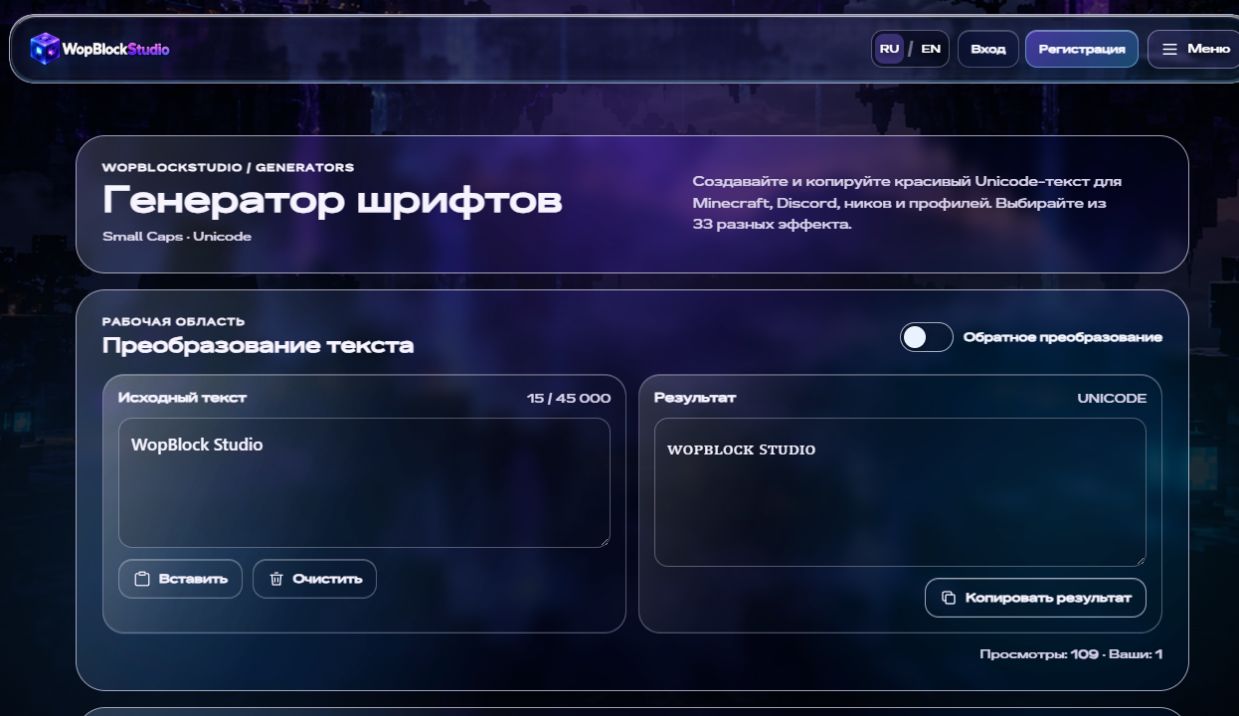
This is our first step
Hey everyone! I've got some news I really wanted to share. The first full generator on WopBlockStudio is now available — a tool for beautiful Unicode text and fonts.
For me, it's more than another page with buttons. I want WBS to be a place where you can chat, follow the project and actually make something useful for Minecraft and your own ideas. This is our first working step in that direction.
What's inside?
Type your text, compare the styles and copy the one you like. There's no font file to download or install: the result is made of Unicode characters you can paste elsewhere.
- 40 Unicode styles, including small caps, decorative frames and new effects for Latin and Cyrillic text.
- Cyrillic effects — including partial Russian Small Caps support.
- Instant preview — compare the results without opening each style separately.
- Search, filters and favorites — get back to styles you like faster.
- One-click copying and reverse conversion for supported characters.
- A / a / 123 / RU indicators — see which characters a style changes.
What can I use it for?
Try it in nicknames, display names, bios, captions, messages and headings. Just keep in mind that apps and games support Unicode differently. Some characters may look unusual or turn into squares. Minecraft Java's official account names also have their own character restrictions — a decorative display name is not the same thing.
So I recommend testing the result right where you plan to use it. The generator shows which types of symbols change, but the final display depends on the app and its fonts.
How to try it
Open the generator, enter something like “Привет WopBlock 123”, choose a style and hit Copy. There's a guide right on the page if you need help.
We won't stop here
This is our first generator — definitely not the last. I've got plenty of ideas for WBS, but I'd rather build them step by step and properly. I want each tool to be useful and comfortable, not just another empty card in a catalog.
Please try it, tell me what works, what you don't like and what tools you'd personally find useful. Thanks to everyone who follows the project, tests new features and points out bugs. Even the small things help me make WopBlockStudio better.
Our first generator. But definitely not our last.
Our first tool, with more to come
Try the styles where you plan to use them and share ideas through the project contacts.